Claude SEO Skill: Set It Up and Run Your First Useful Website Audit
Install the community Claude SEO plugin, run your first page audit, and turn its findings into practical fixes with real evidence and official links.
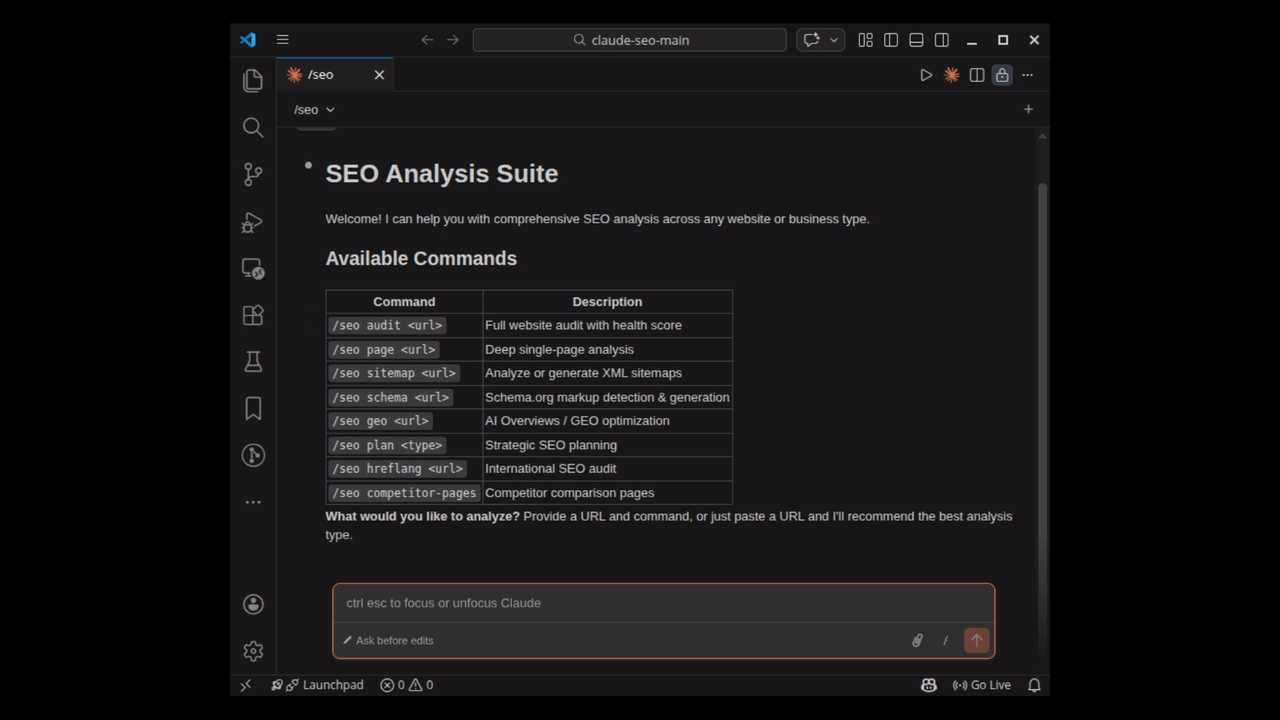
You open your website, notice a few SEO warnings, and then get stuck on the useful question: what should I fix first? That is where Claude SEO can help. It gives Claude Code a structured way to inspect a site and explain the next steps in plain language.
Claude SEO by Daniel Agrici is a community project, not an official Anthropic SEO product. Its public code is MIT licensed. This guide follows the repository documentation checked on 27 October 2026; it is a setup walkthrough, not a claim that we have benchmarked the tool or improved a site's rankings with it.
Actual frame from the project’s Claude Code demo. Credit: Daniel Agrici and contributors, MIT licence. Demo interface and commands may vary by release.

What does the skill actually do?
Think of it as an organised checklist with an assistant attached. The documented checks cover crawlability, indexing, page content, structured data, performance and AI search readiness. There are also workflows for local businesses and online stores. You can start with one page instead of asking it to inspect an entire website immediately.
The useful output is the explanation behind a finding. A missing title is straightforward. A recommendation to change a service page needs more context: which search intent is missing, what is already on the page, and how will you check the change? Ask the assistant to include that evidence.
Before you install
You need a working, signed-in Claude Code installation. The project currently lists Claude Code 1.0.33 or newer. Use a current supported release and read the installation guide if your environment differs.
The public plugin is free, but Claude Code model access still follows your plan or API billing. Optional connections to outside SEO services can have their own charges. You do not need to connect a paid keyword database just to try the basic audit workflow.
Step 1: install the plugin inside Claude Code
Open Claude Code in a folder where you want to keep your audit files. Enter these commands one at a time in its command interface. These slash commands belong inside Claude Code, rather than a normal PowerShell or Bash prompt.
/plugin marketplace add AgriciDaniel/claude-seo
/plugin install claude-seo@agricidaniel-claude-seo
/seo setup
The setup command prepares the plugin's Python environment and headless browser. Once it finishes, check that the runtime is ready:
/seo doctorIf a command does not appear after installation, reopen the session and check the installation guide. Fix a missing runtime or browser before trusting an incomplete audit.
Step 2: start with one real page
Choose a public page you own or are authorised to review. Replace the example URL below with your actual service, product or article URL:
/seo page https://example.com/servicesA focused first request makes the report easier to judge. For example:
Review this page. For each important finding, show the affected URL, the evidence, why it matters, and one way to verify the fix. Separate observed issues from suggestions. Prepare recommendations before changing any files.
Open the page yourself alongside the report. Confirm that its title, main heading, links and visible content match what the tool describes. If the page needs JavaScript, ask whether the result came from rendered content or only the initial HTML.
Step 3: use the commands that fit the problem
/seo audit https://example.com
/seo technical https://example.com
/seo schema https://example.com
/seo geo https://example.com
The first command reviews the site more broadly. Technical checks focus on the website foundation; schema checks help review structured data; GEO checks examine aspects of AI search readiness. The command reference explains the available workflows.
For optional Google data connections, the project documents /seo google setup. Connect the correct property and review the requested access. Without Search Console or analytics data, the assistant cannot know your actual clicks, conversions or private query history just by looking at a public page.
Turn the report into a small work list
Our suggested workflow is to pick three findings: one access problem, one page-content problem and one improvement you can measure. Record the affected URL, the change and the validation method. For a broken link, verify the destination. For structured data, compare the markup with visible content. For a content change, observe relevant search data over time.
A high audit score does not establish a good ranking. Google explains that AI search features use established SEO foundations; no plugin can promise inclusion in an AI answer. Treat recommendations as hypotheses that need evidence.
Also keep privacy in mind: the plugin runs within Claude Code, so content you send for model analysis can go to the model provider. Locally saved reports do not make model processing entirely offline. Avoid adding customer records, secrets or unnecessary private data to an SEO audit.
Useful links to keep
If you want a wider planning example, read how Makezaa approaches service pages, search intent and evidence. An audit becomes useful when it leads to a clear fix you can check.