LPG Manager BD — Cylinder Distribution & Godown ERP
An LPG distribution ERP by Makezaa Studio, combining cylinder exchange, sales, inventory, accounts and Bengali/English workflows in one web application.
Designed and developed by Makezaa Studio.
Category: Business Software / ERP / Distribution Management
LPG Manager BD is a web-based LPG distribution management application built by Makezaa Studio for the day-to-day work of distributors and godown operators. It brings counter sales, reusable-cylinder tracking, purchases, customer dues and operational accounts into a desktop-first workspace, with English and Bengali interface options.
Explore the live application. The screenshots below show genuine, cropped interface captures—not generated mockups. Demonstration form amounts were set to zero and left unsaved; customer details and business balances are not included.
The operational problem
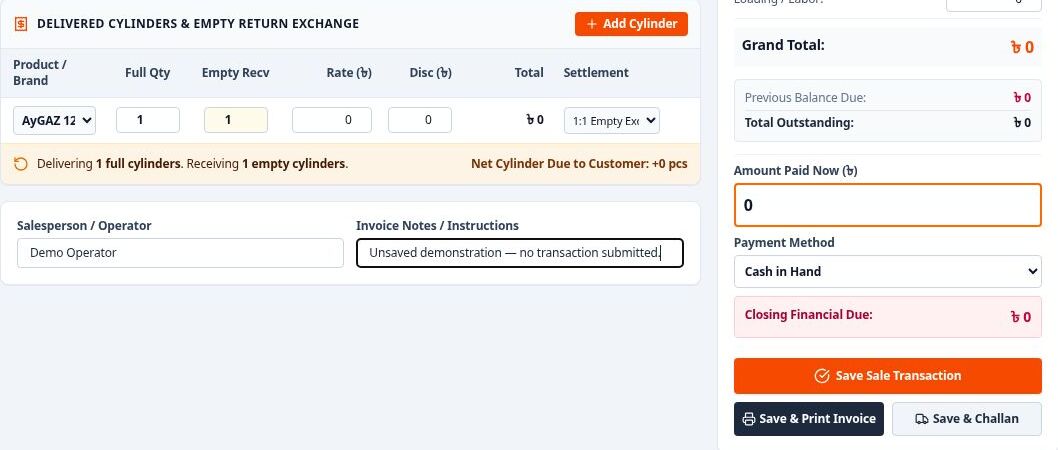
A cylinder sale involves more than a payment. Filled cylinders leave the godown, empty cylinders return, and a dealer may owe both money and physical cylinders. Treating these as separate records makes it harder to understand the full position of an order. This application places quantity, exchange and settlement controls together so an operator can see the relationship while preparing a sale.
Core workflows
- Sales and POS: prepare cylinder line items with quantities, rates and discounts; record empty-cylinder exchanges; choose exchange, cylinder-due, deposit or outright-sale settlement; and prepare invoice or delivery-challan output.
- Purchases and depot receipts: organise supplier selection, challan references, arrival details, incoming filled cylinders and empties returned to the depot.
- Cylinder inventory: views for current stock, stock movements and damaged or leaking cylinders, alongside customer-held cylinder tracking and reconciliation reports.
- Customer and supplier accounts: directories, financial ledgers, customer credit information and supplier-payment workflows connect the commercial side of distribution to cylinder operations.
- Cashbook and expenses: payment collections, money receipts, operating-expense forms and financial-summary screens support everyday administrative work.
- Reports and controls: daily statements, cylinder audits, month-closing views, an activity log and role-aware navigation are implemented in the workspace.
An interface built around repeatable tasks
The POS interface calculates the relationship between filled-cylinder quantities and returned empties as the form changes. In the verified demonstration, changing the sale quantity in exchange mode also updated the expected empty-return quantity. The workflow offers distinct actions for saving a transaction, preparing an invoice and preparing a challan.
Language switching changes operational labels and number formatting without leaving the current form. The gallery shows the same unsaved workflow in English and Bengali. An expense-entry dialog keeps category, date, payment account and particulars together, making the structure of a routine entry easy to follow.
Implementation and optional AI workspace
The frontend uses React and TypeScript with Vite and Tailwind CSS. Recharts supports visual reporting, while Lucide React supplies interface icons. Dedicated components separate sales, purchases, inventory, customers, suppliers, accounts and reporting rather than placing every workflow in one screen.
Supabase data-service modules provide PostgreSQL integration and synchronization paths. An Express backend and Google GenAI SDK support the implemented AI chat service; the code also includes structured operations for sales, payments, stock adjustments and expenses. An AI workspace is present in the live interface, but provider configuration and backend availability determine whether those capabilities can be used in a particular deployment.
This portfolio review did not submit an AI request, execute an AI action, save a transaction or synchronize a database. The project is presented as implemented application work, not as a security certification, compliance guarantee or claim of measured business results.
Screenshot gallery
Select a screenshot or its full-size link to inspect it. All captures are from the real application on October 12, 2026. They are cropped to protect operational information; values shown in the forms are unsaved demonstration values.
Sales and cylinder exchange
Actual English POS interface, cropped to an unsaved demonstration form. Amounts were set to zero for this capture; no sale was saved. Screenshot: Makezaa Studio. Open the full-size screenshot.
Bengali operational interface
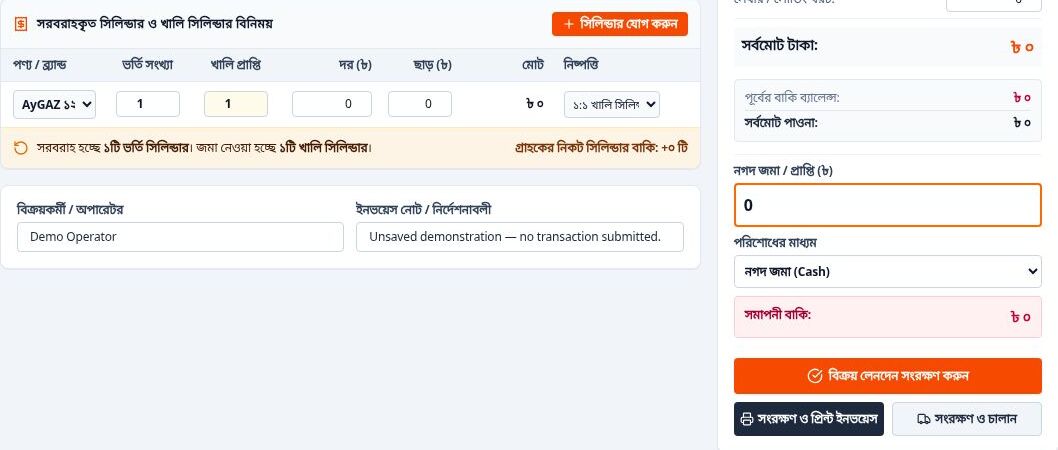
The same unsaved POS workflow after switching the real application to Bengali. No transaction was submitted. Screenshot: Makezaa Studio. Open the full-size screenshot.
Expense-entry dialog
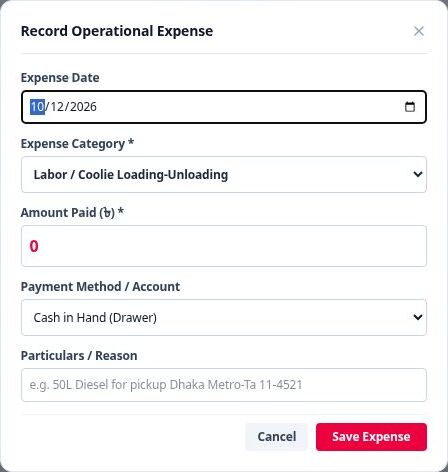
Actual expense-entry dialog, cropped to exclude business records. A zero amount and blank notes are shown; no expense was saved. Screenshot: Makezaa Studio. Open the full-size screenshot.
Deployment considerations
A production rollout needs its own authentication, database-policy, backup and AI-service configuration checks. The live link demonstrates the current interface; this page does not disclose business records, API credentials or imported financial files. Cloud persistence and AI should be validated in the intended environment before operational use.
For related Makezaa software work, explore our agent-ready web platform.
More projects
Eagle Golfferðir — Animated Golf Travel Website
An animated golf travel website for Eagle Golfferðir, combining Icelandic content, destination showcases, an interactive gallery and email enquiries.
Typed Decision Reliability — CFPB Temporal-Shift Feasibility Pilot
A public, reproducible CPU-only research pilot evaluating temporal shift, label quality, duplication and confidence reliability in CFPB debt-collection complaint classification. Includes a TF-IDF/logistic-regression baseline, chronological tests and a documented GO/NO-GO decision; no neural or Laya training is claimed.
An-Noor – Charity & Donation Platform with Payment Integration
A secure and user-friendly donation platform developed for An-Noor, a UK-based charity organization. The website features seamless Stripe and PayPal payment integration, enabling supporters to donate quickly and securely from anywhere in the world.