Little Work Box — Practical Online File Tools
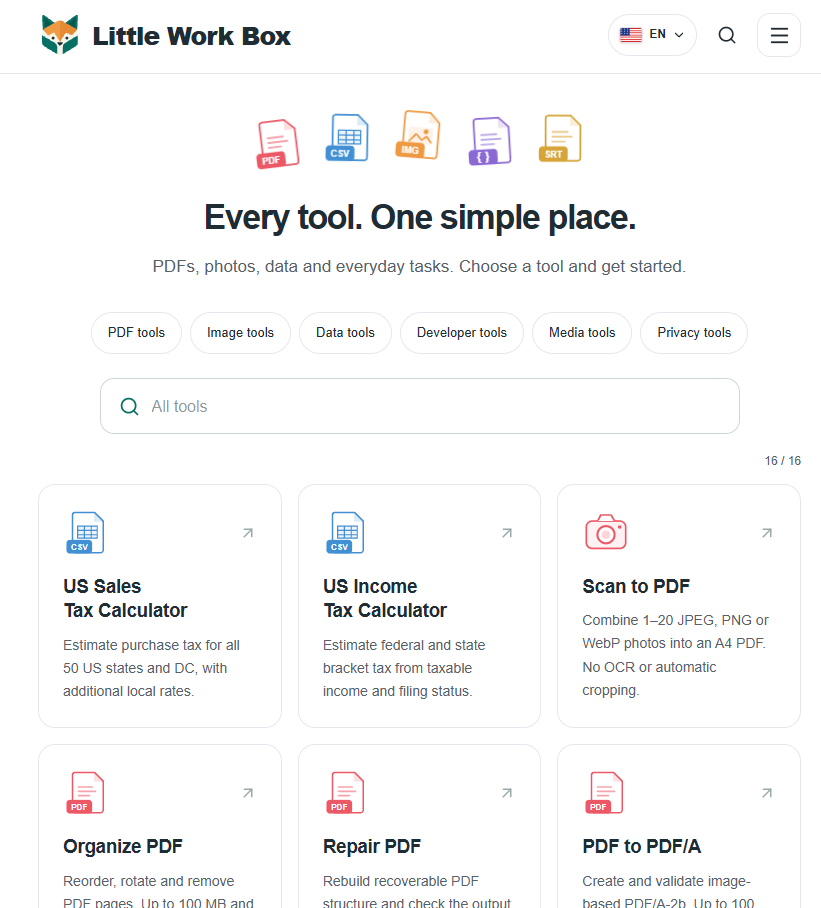
Little Work Box brings together practical tools for PDFs, images, CSV, JSON, subtitles and links, with clear guidance on supported formats and limitations.
Little Work Box is a collection of practical online tools for everyday file tasks. Instead of installing a separate application for each small job, visitors can choose a focused utility for PDFs, images, data files, subtitles or links.
One place for common file tasks
The live toolkit brings 14 utilities together across several categories:
- PDF: scan photos into a PDF; organize pages by sorting, rotating or deleting them; repair recoverable PDF structure; create and validate image-based PDF/A-2b files; check machine-detectable PDF/UA issues; inspect PDF metadata, fonts and structure; and validate ZUGFeRD invoice PDF and XML files.
- Images: resize still JPEG, PNG and WebP images, or remove ordinary EXIF and GPS metadata through re-encoding.
- Data: convert CSV text to UTF-8, remove exactly duplicated CSV rows while preserving quoted and multi-line values, and format, validate or minify JSON without rounding large integers.
- Media and links: shift SRT or WebVTT subtitle timestamps while retaining dialogue text, and remove recognized tracking parameters from HTTP and HTTPS links.
Clear steps and honest limits
Each tool explains supported formats and relevant constraints, helping people understand what an operation will and will not do before downloading a result. Examples include file and page limits, possible quality changes from image re-encoding, and warnings when links may depend on signed or campaign parameters.
Checks are presented as technical findings, not broad guarantees: the accessibility checker distinguishes machine-detectable issues from manual review and does not present a passing result as an accessibility certificate. The ZUGFeRD validator checks technical rules and does not provide legal or tax advice.
A simple workflow
The About page describes a straightforward flow: choose a tool, make a change or run a check, review the output, and download a copy while keeping the original. The basic tools do not require an account. Little Work Box’s privacy page explains how file processing and temporary files are handled.
Explore Little Work Box
Visit littleworkbox.com to explore the full toolkit, including the tools directory, About page and privacy information.